How McDonald’s Is Reinventing the Drive-Thru With Smarter Ordering
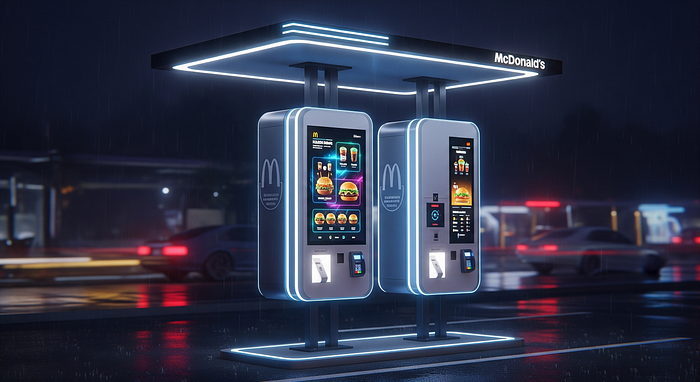
Anyone who has visited a McDonald’s during peak hours knows the scene well: a long line of cars wrapping around the building, drivers checking the clock, and crew members working quickly to keep orders moving. The drive-thru has always been about speed, but expectations have changed. Today, customers want faster service, fewer mistakes, and more control over their orders. At the same time, restaurants face rising labor costs, pressure to improve efficiency, and customers who are already used to mobile apps and digital experiences in everyday life.
This is why drive-thru ordering is changing now. McDonald’s is rethinking how orders are taken, confirmed, and prepared using a mix of digital menus, lane redesigns, voice technology, and app-based tools. The goal is simple: make ordering faster, more accurate, and more consistent. In this blog, we’ll look at what McDonald’s is already changing, where personalized drive-thru ordering is headed next, and what all of this means for customers and crew members on the ground.
What McDonald’s Is Changing in Drive-Thru Ordering Right Now
McDonald’s drive-thru is no longer just a speaker, a menu board, and a payment window. Across many locations, the company and its franchise partners are rolling out upgrades designed to reduce friction and keep lines moving. These changes are not identical everywhere, and results can vary by location, layout, and franchise investment. Still, the overall direction is clear: simplify choices, reduce errors, and support staff during busy periods.
One of the biggest shifts is the move toward clearer, more structured ordering. Instead of overwhelming customers with crowded menu boards, newer designs focus on readability and flow. When customers can decide quickly, they are less likely to hesitate, change their order at the last second, or miscommunicate items. This helps both the customer and the crew.
Another major change is the growing use of technology to assist with order taking. Digital systems can repeat orders back consistently, prompt common add-ons, and handle routine orders during rush hours. This does not remove people from the process entirely, but it does change where human attention is most valuable. Crew members can focus more on food preparation, quality checks, and helping when something goes wrong.
Together, these updates aim to make the drive-thru experience more predictable. Shorter lines, clearer confirmations, and fewer missing items all contribute to a smoother visit. However, McDonald’s also recognizes that no system is perfect, which is why most locations keep human support ready when technology reaches its limits.
Digital Menus and Lane Design That Reduce Confusion
Modern drive-thru menu boards at McDonald’s are designed to be easier to scan at a glance. Brighter screens, better lighting, and cleaner layouts help drivers read options quickly, even at night or in bad weather. Instead of showing everything at once, menus often highlight top-selling items, popular combos, and limited-time offers. This guides decision-making and reduces the time spent searching.
Lane design also plays a role. Some locations use dual or side-by-side lanes that merge later in the process. This allows more cars to place orders at the same time, reducing backups during peak hours. Clear signage and lane markings help drivers know where to go, which lowers stress and confusion.
The overall goal of these changes is to shorten lines and reduce last-second order changes. When customers see clear prices, visuals, and promotions upfront, they are more confident in their choices. That confidence translates into faster ordering and fewer corrections at the payment window.
Voice Ordering and AI Support, What It Does Well and Where It Struggles
Voice ordering systems and AI-powered assistants are becoming more common in McDonald’s drive-thrus. These systems can greet customers, take orders, repeat items, and confirm totals. During busy periods, this can significantly speed up service and reduce missed items caused by background noise or rushed communication.
The strengths are clear. Automated systems are consistent, they don’t get tired, and they can follow the same upsell prompts every time. This helps maintain accuracy and sales during rush hours. However, there are also challenges. Accents, slang, and complex custom orders can still confuse automated systems. Background noise from traffic or weather can also interfere with recognition.
When the system is unsure, most setups are designed to hand the order off to a crew member. This hybrid approach ensures that customers are not stuck repeating themselves endlessly. It also reinforces the idea that technology is there to assist, not replace, human service.

The Next Phase, Personalized Ordering That Feels Made for You
Looking ahead, the next phase of McDonald’s drive-thru kiosk evolution is personalization. The idea is not just to take orders faster, but to make ordering feel more relevant to each customer. This is where data, apps, and smarter systems come together.
Personalization does not mean every customer sees the same experience. Instead, menus and suggestions can adapt based on context. Time of day, local trends, and customer preferences can all influence what appears on the screen or what is suggested during ordering. For example, breakfast items in the morning or cold drinks on a hot day.
At the same time, McDonald’s is aware that personalization raises questions about privacy and choice. Customers want convenience, but they also want transparency and control. The future of drive-thru ordering depends on balancing helpful suggestions with clear boundaries around data use.
App-Powered Drive-Thru, Deals, Favorites, and Faster Reorders
The McDonald’s mobile app is expected to play a bigger role in drive-thru ordering. Customers can save favorite orders, access loyalty deals, and reorder with minimal interaction. In some setups, a customer might check in using a QR code, a code entered at the speaker, or location-based confirmation.
This app-to-drive-thru connection also helps staff. Orders arrive clearly formatted, reducing confusion and rework during busy times.
Personalized Menu Suggestions, Plus the Privacy Trade-Offs
Personalized suggestions are usually based on simple signals. These might include time of day, weather, past orders, or popular local items. The goal is to surface relevant choices, not to pressure customers.
However, not everyone is comfortable with personalization. Some customers worry about how much data is collected or how it is used. Good guardrails make a difference. Clear opt-in options, easy opt-out settings, and simple explanations build trust. When personalization feels helpful rather than intrusive, customers are more likely to accept it.
What the Future Drive-Thru Means for You, Speed, Accuracy, Jobs, and Trust
All of this technology matters only if it improves real outcomes. For customers, that means shorter wait times, more accurate orders, and clearer pricing and deals. For crew members, it means shifting roles rather than removing them entirely.
As ordering becomes more automated, staff can focus more on food preparation, quality control, and customer support. Handling exceptions, special requests, and problem-solving becomes more important than simply taking orders. This can lead to a more balanced workload during rush hours.
Trust remains central. Customers need to feel confident that their order is correct and that mistakes will be handled fairly. Clear confirmation screens, receipts, and friendly staff all contribute to that trust.
How It Could Improve Your Order, and What Could Still Go Wrong
Likely improvements include shorter waits, clearer order confirmation, and fewer missing items. However, problems can still happen. Systems may mishear an item, apps can glitch, or the wrong car might be matched to an order.
Simple habits help. Speak clearly, confirm items on the screen, use the app for complex orders, and check your bag before leaving. These steps keep you in control even as systems change.
The Human Factor, Training, Fairness, and Keeping the Experience Friendly
People still matter in the drive-thru. Crew members handle special needs, resolve mistakes, and keep the experience polite and welcoming. Fairness and accessibility are also important. Systems must work well for different accents, languages, and hearing needs.
Good training and smooth handoffs between technology and staff make the experience feel supportive rather than frustrating.
Conclusion
McDonald’s drive-thru ordering is moving toward a smarter mix of AI, mobile apps, and clearer digital screens. The aim is faster service, better accuracy, and more personalized experiences, without losing the human touch. While technology plays a bigger role, people and trust still matter most. Customers can get the best experience by using confirmation screens, mobile tools, and speaking up when something doesn’t feel right. As improvements continue to roll out, expect changes to vary by location, with steady progress over time toward a smoother drive-thru experience.
FAQs
How does McDonald’s drive-thru AI ordering work?
It uses automated voice systems to take and confirm orders, with staff stepping in when needed.
Is drive-thru personalization mandatory?
No. Customers usually have the choice to opt in or out through app settings or ordering methods.
Will drive-thru technology replace workers?
Roles are shifting toward food prep, quality checks, and customer support rather than order taking.
Does every McDonald’s have the same drive-thru system?
No. Features vary by location and franchise, so experiences may differ.
How can customers avoid mistakes at the drive-thru?
Confirm orders on the screen, use the app for complex orders, and check the bag before leaving.


Comments
Post a Comment